 Abdul Basit
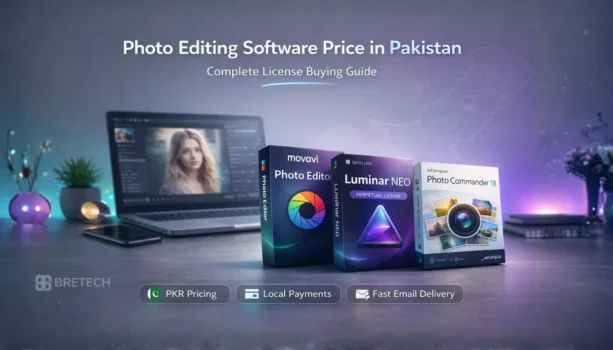
Photo editing software pricing in Pakistan depends on the license type, feature depth, and whether you need beginner tools, AI enhancements, or professional RAW workflow control. Many buyers choose the cheapest option, then hit export limits, missing tools, or activation trouble when a project is urgent.
This guide helps you choose the right genuine license based on your real work. BreTech provides PKR pricing, local payments, and fast digital email delivery on most orders, with official invoices and support as an authorized reseller in Pakistan.
If you want a quick direction: beginners should buy a simple editor, photographers should buy a RAW-capable editor with stronger AI tools, and online sellers may only need watermark protection.
Quick Overview: Main Photo Editing Software Options in Pakistan
| Tool Name | File Types Covered | Best For |
|---|---|---|
| Movavi Photo Editor | JPG, PNG, common camera formats | Beginners and content creators |
| Luminar Neo (Perpetual License) | RAW, JPG, PNG | Photographers and advanced creators |
| Ashampoo Photo Commander 18 | JPG, PNG, RAW | Managing and editing large libraries |
| Wondershare Fotophire Toolkit | JPG, PNG, standard enhancement tasks | Users who want easy editing, background cleanup, and object removal |
| Wondershare Fotophire Maximizer | JPG, PNG and enlarged exports | Users who need photo upscaling or sharper enlarged images |
| Wondershare Fotophire Focus | JPG, PNG and blur correction | Users who want to fix slightly blurry photos or apply focus effects |
You can browse all options in Photo Editing Software. Compare top brands like Movavi, Skylum, Ashampoo, and Wondershare on BreTech.
What Really Affects Photo Editing Software Pricing in Pakistan
Pricing usually changes because of three things: the license model, editing depth, and usage rights.
A simple editor costs less because it focuses on quick enhancement and basic cleanup. A photographer-grade tool costs more because it supports RAW files, stronger portrait tools, and smarter lighting controls. Library-style tools sit in the middle because they add organising, batch export, and archive features.
In Pakistan, one more thing matters: how easily you can pay and get delivery. When your work is time-sensitive, you want a genuine license with clear activation and invoice support.
License Types Explained in Simple Words
Subscription License
You pay monthly or yearly. Updates are usually included while your subscription is active. This suits creators who want the latest features, but you must plan for renewals.
Perpetual License
You pay once for that version and keep using it. This suits users who want a fixed cost and stable workflow for years.
Commercial Use
If you edit photos for clients, studio work, ecommerce listings, or paid social media content, you should choose a license that allows commercial use. This is where many people buy the wrong plan and later need to upgrade.
Best Choice If You Are a Beginner
If your work is social posts, thumbnails, class projects, or basic product images, you need speed and simplicity more than advanced RAW workflow. A clean interface helps you learn faster and get consistent results without complex steps.
Movavi Photo Editor is a practical pick for beginners because it keeps the workflow simple and gives you smart tools for quick improvements.
Best Choice If You Are a Photographer
If you shoot in RAW and edit wedding albums, portraits, or studio sets, you need deeper control. This usually includes stronger lighting fixes, portrait refinement, and workflow tools that help you deliver a consistent look across a full album.
Luminar Neo (Perpetual License) fits photographers who want advanced AI tools without being forced into a subscription style workflow.
Best Choice If You Manage Large Photo Libraries
Some users do not only edit. They also manage folders, sort archives, export sets for clients, and create slideshows. In this case, a tool that combines organisation and editing saves time and avoids file confusion.
Ashampoo Photo Commander 18 is built for people who handle large collections and need editing plus management in one place.
Special Case: Quick Enhancement or Watermark Protection
Sometimes you do not need a full editor. You need one very specific job done fast.
If you want one-click improvements and batch enhancement for albums, Ashampoo Photo Optimizer 11 is a focused option.
If you upload product images daily and want to protect your photos from copy-paste reuse, WonderFox Photo Watermark is the better buy because it is built for batch watermarking.
Additional Wondershare Fotophire Tools for Specific Photo Editing Needs
Not every buyer in Pakistan needs a full professional editor. Some users only want a simple tool that solves one specific photo problem quickly.
The Wondershare Fotophire range fits this type of user. These tools are designed for straightforward editing tasks such as removing unwanted objects, enlarging images, or correcting blur without needing complex editing workflows.
Wondershare Fotophire Toolkit
Wondershare Fotophire Toolkit is the most complete option in the Fotophire range. It combines simple editing tools with background removal, object erasing, and basic enhancement features in one package.
This type of tool works well for students, freelancers, bloggers, and online sellers who want quick photo improvements without learning advanced editing software. It is particularly useful for cleaning up product photos, removing unwanted objects, or improving older images before posting them online.
Wondershare Fotophire Maximizer
Wondershare Fotophire Maximizer focuses mainly on enlarging images while maintaining better sharpness and clarity.
This is helpful when you need to upscale product photos, enlarge pictures for posters or banners, or improve small images for printing. Instead of buying a full editing suite just for resizing, this focused tool allows users to increase image resolution with less quality loss.
Wondershare Fotophire Focus
Wondershare Fotophire Focus is designed for correcting blur and improving focus in photos.
Many everyday photos suffer from slight blur or soft details, especially when taken quickly on a phone or camera. This tool helps sharpen those images and can also apply creative background blur effects for portraits or social media visuals.
For users who only need blur correction and simple focus adjustments, this type of specialized tool can be easier to use than a complex editing program.
What to Avoid When Comparing Price in Pakistan
Avoid choosing only by the lowest price. A cheap editor that cannot handle your file type or your workflow can cost you more time than it saves.
Avoid using unsafe copies because they often break after Windows updates, fail activation, or create performance issues. Trials can also have export limits or watermark restrictions, so always check what you will get before you commit.
Avoid buying a one-PC plan if you work across multiple devices, and avoid the wrong usage rights if you earn from client work.
Real Pakistan Use Cases That Decide the Right Plan
A wedding photographer in Lahore usually needs RAW support and faster album workflows, so a photographer-grade tool makes sense. A student in Islamabad mostly needs simple editing for assignments and social posts, so a beginner-friendly editor is enough. A seller in Faisalabad who uploads product images daily usually needs watermark protection more than deep editing features.
When you match the tool to your real job, your spending becomes stable and your results become consistent.
Conclusion
Photo editing software price in Pakistan should be judged by license type, file support, and your editing workload. Beginners should choose simple and easy tools. Photographers should choose deeper control with RAW and advanced AI workflow tools. Library users should choose tools built for organising and batch export. Sellers should choose a tool designed for watermark protection.
For full tool comparisons, read Best Photo Editing Software in Pakistan (2026).
FAQs
Q: What is the average photo editing software price in Pakistan?
A: Photo editing software price in Pakistan depends on the license type and features. Beginner editors usually cost less, while professional RAW and AI-powered tools cost more. Commercial licenses are typically priced higher than personal editions.
Q: Is it better to buy a subscription or a lifetime license?
A: A subscription is better if you want continuous updates and new features every year. A lifetime license is better if you prefer a one-time payment and stable long-term use without renewals.
Q: Do I need a commercial license for freelance photo editing in Pakistan?
A: Yes. If you earn money from client projects, wedding shoots, product photography, or social media work, you should choose a license that allows commercial use to avoid compliance issues later.
Q: Why are professional photo editors more expensive?
A: Professional editors include RAW file support, advanced AI tools, portrait enhancement, and batch processing. These features increase workflow speed and image control, which is why the price is higher.
Q: Can I use a single-PC license on multiple devices?
A: No. A single-PC license is valid for one device only. If you work on multiple laptops or studio systems, you should choose a multi-device or higher edition license.
Q: Is it safe to buy photo editing software from local sellers in Pakistan?
A: It is safe only if the seller provides a genuine license, official invoice, and activation support. Buying from authorized resellers ensures proper delivery, updates, and long-term usability.
Q: Which type of photo editing software is best for Daraz and online sellers?
A: Online sellers usually need fast cleanup and watermark protection. A beginner-friendly editor or a dedicated watermark tool is often enough for product images and catalog uploads.
Related guides
- Best AI photo editors and image editing tools for Pakistan
- Best photo editing software for photographers in Pakistan
- Best Photo Editing Software in Pakistan
- Photo Editing Software Price in Pakistan
For more guides, visit: Design & Multimedia Guides