 Abdul Basit
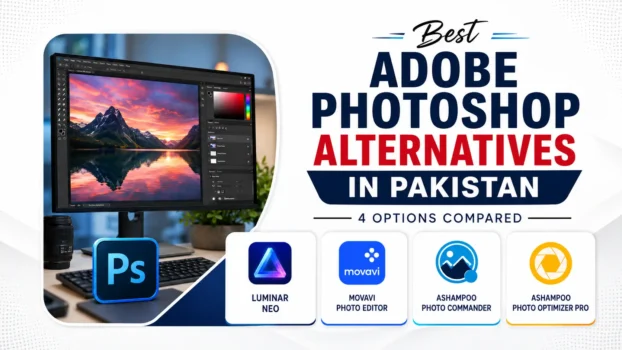
Adobe Photoshop uses a recurring subscription model. For many freelancers, small businesses, and students in Pakistan, that ongoing cost is simply not practical. The good news is that several strong Photoshop alternatives exist, and some of them are available as lifetime or perpetual purchases with PKR pricing through BreTech.
This guide compares four options, Luminar Neo, Movavi Photo Editor, Ashampoo Photo Commander, and Ashampoo Photo Optimizer Pro, so you can choose the right tool for your actual needs. Whether you edit photos professionally or just want to clean up family pictures, at least one of these will fit your workflow and budget.
Key Takeaways
- Luminar Neo is the strongest of these four for creative editing, retouching, RAW workflows, layers, and masking.
- Movavi Photo Editor is a strong option for quick edits, retouching, and beginner-friendly photo work.
- Ashampoo Photo Commander and Ashampoo Photo Optimizer Pro are better suited for photo management, quick fixes, and enhancement, not full creative editing.
- All four tools are available as genuine software licenses in Pakistan through BreTech, with PKR pricing and local payment options.
- None of these tools fully replicate every Photoshop feature, but each covers a specific use case well.
- Buying a genuine license gives you a proper activation path, while BreTech also provides activation help and invoice support.
Why Look for the Best Adobe Photoshop Alternatives in Pakistan
Adobe moved to a subscription model years ago. For users in Pakistan, the recurring cost may not make sense if they only need specific photo-editing features. Many users end up using cracked software, which carries real risks, including malware, no updates, no support, and legal exposure for businesses.
Buying a genuine license from a local store like BreTech solves these problems. You get a working, licensed product, digital delivery, and activation guidance. You also get invoice support, which matters for businesses and schools that need documentation.
The 4 Tools at a Glance
Before going deeper, here is a quick overview of where each tool fits:
| Tool | Best For | Photoshop Replacement Level |
|---|---|---|
| Luminar Neo | Creative editing, AI retouching | Strong alternative |
| Movavi Photo Editor | Quick edits, beginners, freelancers | Solid mid-range alternative |
| Ashampoo Photo Commander | Photo organization + basic editing | Light editing only |
| Ashampoo Photo Optimizer Pro | Fast enhancement + manual corrections | Not a full Photoshop replacement |
Luminar Neo: The Strongest Creative Alternative
Luminar Neo by Skylum is the most capable of the four tools. It uses AI-powered tools to handle tasks that would take significant skill and time in Photoshop, including sky replacement, portrait retouching, masking, and light adjustments.
Who it suits: Photographers, creative freelancers, social media content creators, and anyone who needs professional-looking results without spending years learning complex software.
Key features:
- AI sky replacement and relighting
- Portrait retouching with skin smoothing and face tools
- Layers and masking support
- RAW file editing
- Non-destructive editing workflow
- Additional AI-assisted editing tools
Luminar currently supports RAW files, layers, masking, and a perpetual desktop licensing option.
Limitations to know: Luminar Neo does not have the same depth as Photoshop for graphic design work. If you need to build multi-element compositions, design marketing materials from scratch, or work with complex vector paths, Luminar Neo will feel limited. It is a photo editor first, not a general-purpose design tool.
For Pakistan-based photographers looking at AI-powered tools, the best AI photo editors in Pakistan guide covers this category in more detail.
Verdict: If you want the closest experience to Photoshop’s photo-editing side, without the subscription, Luminar Neo is the top pick.
Movavi Photo Editor: Practical and Beginner-Friendly
Movavi Photo Editor 2026 sits between a basic consumer tool and a professional editor. It handles common editing tasks cleanly, with a straightforward interface that does not require a steep learning curve.
Who it suits: Freelancers doing product photography, students, home users, and small business owners who need clean, edited images without complexity.
Key features:
- Background removal and replacement
- Object removal
- Skin retouching and portrait tools
- Color correction and filters
- Batch processing for multiple images
- Captions and image effects
- RAW file support
Movavi Photo Editor 2026 currently includes AI enhancement, background replacement, object removal, portrait retouching, color correction presets, RAW support, and both annual and lifetime license options.
Limitations to know: Movavi Photo Editor does not support full layer-based editing the way Photoshop does. Advanced compositing, detailed masking workflows, and plugin support are not part of its main workflow. It works best for single-image editing tasks rather than complex multi-layer projects.
Verdict: A practical, affordable choice for users who need reliable photo editing without a steep learning curve.
If you are comparing photo editing software options more broadly, the best photo editing software for photographers in Pakistan guide is worth reading alongside this one.
Ashampoo Photo Commander: Organization Plus Light Editing
Ashampoo Photo Commander 18 is a different kind of tool. It combines a photo manager with editing features, making it useful for users who need to organize large photo libraries and apply simple enhancements.
Who it suits: Home users, families, and small offices that store large numbers of photos and want basic editing without switching between multiple apps.
Key features:
- Photo library management and tagging
- Slideshow creation and calendar printing
- Basic color correction, crop, and rotate
- Red-eye removal and simple retouching
- Batch renaming and format conversion
- RAW file support
Photo Commander 18 supports current RAW formats and batch image processing.
Limitations to know: Photo Commander is not a Photoshop alternative in the same creative sense as Luminar Neo. It lacks Photoshop-style layers, advanced masking, and complex compositing tools. Think of it as a photo manager with useful editing features, not a full creative editing platform.
Verdict: Useful for managing and lightly editing photos. Not suitable for complex professional compositing or graphic design work.
Ashampoo Photo Optimizer Pro: Fast Batch Enhancement
Ashampoo Photo Optimizer Pro 26 focuses on fast photo enhancement. It can automatically analyze and improve photos in batches, while also providing manual controls when you want to make your own corrections.
Who it suits: Users who have large collections of photos that need quick, consistent improvement. Event photographers and other users processing many images may also find it useful as a fast enhancement tool.
Key features:
- Automatic photo optimization
- Batch processing for large photo sets
- Exposure, color, and contrast correction
- RAW file support
- Perspective correction
- Manual photo adjustments
- LUTs and creative effects
Current Photo Optimizer Pro 26 supports automatic and manual editing, enhanced RAW support, perspective correction, and batch processing.
Limitations to know: This tool does not provide Photoshop-style layers, advanced masking, or complex compositing. It is primarily designed for fast enhancement and straightforward photo corrections rather than detailed creative editing.
Verdict: Helpful as a time-saving utility for bulk photo improvement and manual corrections. It is not a replacement for complex Photoshop editing.
Side-by-Side Comparison of the Best Adobe Photoshop Alternatives
| Feature | Luminar Neo | Movavi Photo Editor | Ashampoo Photo Commander | Ashampoo Photo Optimizer Pro |
|---|---|---|---|---|
| Layers & Masking | Yes | Limited | No | No |
| AI Editing Tools | Advanced | Yes | No | Automatic optimization |
| RAW File Support | Yes | Yes | Yes | Yes |
| Photo Management | Basic | No | Strong | No |
| Batch Processing | Yes | Yes | Yes | Yes |
| Skill Level Needed | Intermediate | Beginner | Beginner | Beginner |
| Photoshop Replacement | Strong for photo editing | Moderate | Light | Not a full replacement |
Buying Genuine Software Licenses in Pakistan
One point worth addressing directly: all four tools above are available as genuine software licenses in Pakistan through BreTech. This matters more than it might seem.
Cracked or pirated photo editing software is common in Pakistan, but it creates real problems. Cracked software can contain malware, may not receive normal updates, and can expose your files and system to risk. For businesses and freelancers, using unlicensed software can also create legal and professional risk.
BreTech offers PKR pricing, local payment options, digital delivery, invoice support, and activation help. You do not need a foreign credit card or an international payment account.
You can browse available products in the Photo Editing Software category or check the best photo editing software in Pakistan guide for a broader view of what is available locally. BreTech’s current Photo Editing category includes all four products compared in this article.
Which Tool Should You Choose
Here is a simple decision guide:
- Choose Luminar Neo if you are a photographer or creative professional who needs AI-powered editing, RAW support, and layer-based work. It is the closest genuine Photoshop alternative here for photo-editing tasks.
- Choose Movavi Photo Editor if you are a beginner or freelancer who needs clean, reliable editing without complexity. It handles most everyday tasks well.
- Choose Ashampoo Photo Commander if your main need is organizing a large photo library with occasional editing. Do not expect Photoshop-style creative features.
- Choose Ashampoo Photo Optimizer Pro if you need to automatically improve large batches of photos quickly while still having access to useful manual corrections.
If you are unsure which license suits your setup, you can reach the BreTech team through the contact page for guidance before purchasing.
Conclusion
Adobe Photoshop is a powerful tool, but it is not the only option, and for many users in Pakistan, it is not the most practical one. Luminar Neo and Movavi Photo Editor both offer strong photo-editing features, with non-subscription license options available. Ashampoo Photo Commander and Ashampoo Photo Optimizer Pro serve more specific photo-management and enhancement use cases.
The right choice depends on what you actually need to do with your photos. A freelance photographer has different requirements than a home user organizing holiday pictures. Match the tool to the task, buy a genuine license with PKR pricing and local payment options, and you will have a reliable setup that fits your needs.