Abdul Basit
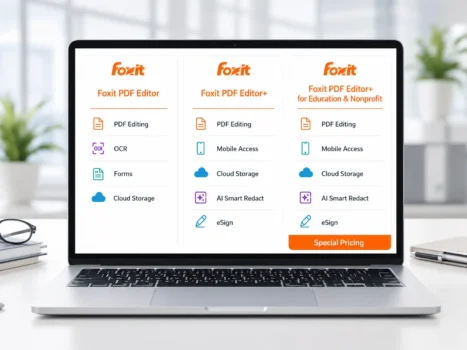
Choosing the right Foxit PDF Editor in Pakistan depends on how you work, which devices you use, whether you need cloud services or eSign, and whether you prefer an annual subscription or a one-time perpetual license.
Foxit PDF Editor is suitable for professional PDF editing, OCR, conversion, forms, document comparison, and security. Foxit PDF Editor+ includes the same main PDF tools and adds mobile access, Smart Redact, Foxit eSign, and additional connected services.
Foxit PDF Editor is also available separately as a perpetual desktop license for customers who prefer a one-time purchase.
This guide explains the main Foxit PDF Editor options and the important differences between subscription and perpetual licensing for buyers in Pakistan.
Key Takeaways
- Foxit PDF Editor Annual is the standard subscription for professional PDF editing, OCR, conversion, forms, document comparison, security, cloud access, and ongoing updates.
- Foxit PDF Editor+ Annual includes the main PDF Editor features and adds mobile apps, Smart Redact, 150 Foxit eSign envelopes per year, and additional connected services.
- Foxit PDF Editor Perpetual is a one-time desktop license for a specific version. It does not expire, but it does not receive the same continuous subscription update cycle.
- Foxit perpetual licenses follow an N/N-1 support policy, so the current major version and immediately previous major version receive active support.
- Education and nonprofit licensing uses special eligibility, pricing, and quotation terms and should be confirmed before ordering.
Foxit PDF Editor Options at a Glance
| Option | Main Difference | Best For |
|---|---|---|
| Foxit PDF Editor Annual | Standard subscription with desktop, web, cloud services, AI access, and ongoing updates | Home users, professionals, and offices needing regular PDF work |
| Foxit PDF Editor+ Annual | Adds mobile apps, Smart Redact, 150 eSign envelopes per year, and more connected services | Teams needing mobile work, eSign, redaction, and broader workflows |
| Foxit PDF Editor Perpetual | One-time desktop license for a specific version | Customers who prefer a one-time purchase and do not need subscription services |
| Education / Nonprofit Licensing | Special PDF Editor+ licensing and pricing subject to eligibility | Qualifying schools, institutions, and nonprofit organizations |
Foxit PDF Editor Annual Subscription
Foxit PDF Editor is suitable for individuals, professionals and offices that need full PDF editing without the additional mobile, eSign and Smart Redact services included with PDF Editor+.
Main PDF Editing Features
Foxit PDF Editor can help users:
- Edit PDF text and images
- Add, remove, rotate and reorder pages
- Merge and split PDF documents
- Convert PDF files to Word, Excel and PowerPoint
- Create PDFs from other document formats
- Use OCR to make scanned documents searchable and editable
- Create, fill and work with PDF forms
- Compare different versions of a document
- Add comments, annotations and markups
- Apply password protection and PDF security
- Organize and manage PDF documents
Foxit continues to develop the Editor product for professional document editing, OCR, forms, conversion, document security and connected workflows.
For practical conversion help, see how to convert PDF to Word without losing formatting and how to convert Word to PDF without losing formatting.
Subscription Services
The Foxit PDF Editor subscription provides access across supported Windows, macOS and web environments.
Foxit also gives PDF Editor subscribers 20 free AI Assistant credits per user each month. These credits can be used for supported AI tasks such as document summaries, translation, rewriting and document questions. Customers who need heavier AI use can purchase the full AI Assistant plan with 2,000 credits per month.
BreTech’s April 2026 APAC reseller package also lists:
- PDF Editor Cloud
- Cloud integrations and connectors
- Admin Console On-Cloud
- Cloud storage allowance
- AI Assistant access
The APAC package supplied to BreTech lists 20 GB of cloud storage for Foxit PDF Editor. However, Foxit introduced Foxit DMS in 2026 and states that DMS is included with paid Foxit PDF Editor subscriptions. Cloud and storage packaging may therefore change by region or package, so the current entitlement should be confirmed in the quotation.
Who Should Choose Foxit PDF Editor Annual?
Foxit PDF Editor Annual may be suitable when you:
- Mainly work on Windows, Mac or the web
- Need professional PDF editing and conversion
- Work with scanned documents and OCR
- Create or complete PDF forms
- Need document comparison
- Want current security and feature updates
- Need basic AI Assistant access
- Do not need the included mobile application
- Do not need 150 eSign envelopes
- Do not need Smart Redact
For many home users, freelancers, consultants and office users, Foxit PDF Editor Annual provides the main tools required for everyday professional PDF work.
Foxit PDF Editor+ Annual Subscription
Foxit PDF Editor+ includes the main Foxit PDF Editor features and adds services for users who work across desktop, web and mobile environments.
What Foxit PDF Editor+ Adds
Foxit PDF Editor+ includes:
- Foxit PDF Editor for Windows and macOS
- Foxit PDF Editor Cloud
- Foxit PDF Editor Mobile
- AI Assistant access
- Smart Redact
- Foxit eSign with 150 envelopes per year
- Connected document services
Foxit confirms that every PDF Editor+ license includes 150 eSign envelopes per year. Foxit also identifies the mobile application and Smart Redact as key Editor+ benefits.
The April 2026 APAC reseller package supplied to BreTech also lists:
- Cloud integrations and connectors
- Admin Console On-Cloud
- 150 GB cloud storage
As with the standard Editor package, current cloud and storage entitlements should be confirmed before purchase because Foxit’s cloud services continue to develop. Foxit’s 2026 DMS release states that its document management system is included with paid PDF Editor subscriptions.
What Is Smart Redact?
Smart Redact helps users identify sensitive information that may need to be permanently removed from documents.
This can be useful when working with:
- Customer records
- Employee information
- Contracts
- Financial records
- Identification details
- Other confidential documents
Smart Redact is included with PDF Editor+ and is separate from the normal manual redaction tools available for PDF work.
AI-assisted redaction should still be reviewed by the user before a document is shared or published.
See our guide to PDF redaction software in Pakistan for more information about redaction workflows.
How Foxit eSign Envelopes Work
An eSign envelope is normally a group of one or more documents sent as part of a signature request.
Foxit eSign can help users:
- Send documents for signature
- Request electronic signatures
- Track signing progress
- Receive completed documents
- Manage approval and signature workflows
PDF Editor+ includes 150 Foxit eSign envelopes per user each year.
This is different from simply placing your own signature inside a PDF.
Organizations requiring higher signing volumes, APIs, advanced templates or more eSign controls can also browse Electronic Signature software.
For businesses comparing dedicated e-signature platforms, read our Foxit eSign vs DocuSign comparison to compare signing workflows, business features, integrations, and which option may fit your organization better.
Who Should Choose Foxit PDF Editor+?
Foxit PDF Editor+ may be the better option if you:
- Edit PDFs on phones or tablets
- Work across desktop, web and mobile devices
- Send contracts or forms for electronic signature
- Need Smart Redact
- Need 150 included eSign envelopes per year
- Want connected document services in one subscription
- Prefer ongoing subscription updates
If you mainly edit PDFs from a computer and do not need mobile editing, Smart Redact or included eSign envelopes, standard Foxit PDF Editor may be sufficient.
Foxit PDF Editor vs PDF Editor+: Main Differences
| Feature | Foxit PDF Editor Annual | Foxit PDF Editor+ Annual |
|---|---|---|
| PDF editing | Included | Included |
| OCR | Included | Included |
| PDF conversion | Included | Included |
| Forms | Included | Included |
| Document comparison | Included | Included |
| PDF security | Included | Included |
| Windows | Included | Included |
| macOS | Included | Included |
| Web access | Included | Included |
| Mobile app | Not included in standard package | Included |
| AI Assistant free credits | 20/month | 20/month |
| Smart Redact | Not included | Included |
| Foxit eSign | Not included | 150 envelopes/year |
| Admin Console On-Cloud | Listed in BreTech APAC package | Listed in BreTech APAC package |
| APAC cloud storage listing | 20 GB* | 150 GB* |
| Ongoing subscription updates | Included while active | Included while active |
*The 20 GB and 150 GB figures are from BreTech’s April 2026 APAC reseller package. Foxit introduced additional document-management services in 2026, so current cloud and storage entitlements should be confirmed before ordering.
Foxit PDF Editor Perpetual License
Foxit PDF Editor is also available as a separate perpetual desktop license.
A perpetual license is a one-time purchase for a specific version of Foxit PDF Editor. The purchased version does not expire simply because a subscription period ends.
Foxit’s license agreement describes a single-use perpetual license as software licensed to an authorized end user for use under the applicable license conditions. It is different from a subscription license, which remains valid only while the subscription is active and paid.
What the Perpetual License Includes
The perpetual license provides the Foxit PDF Editor desktop product and its normal PDF editing functions, including tools for:
- Editing PDFs
- Creating PDFs
- Converting documents
- OCR
- Forms
- Annotation
- Page organization
- Document comparison
- PDF protection and security
It should not be confused with the subscription packages.
Foxit’s official comparison shows that services such as Foxit Cloud, AI Assistant, frequent feature upgrades, cloud applications, mobile applications, eSign and Smart Redact are subscription benefits rather than standard perpetual-license benefits.
Foxit also states that its paid AI Assistant plan is not available for perpetual licenses.
BreTech has also received confirmation from Foxit that Admin Console On-Cloud is not included with the standard perpetual license and can be purchased separately as an annual service.
Updates and Support for Foxit Perpetual Licenses
A perpetual license does not mean that one version receives updates forever.
Foxit currently follows an N/N-1 support policy for its perpetual PDF Editor releases.
- N means the current major perpetual version.
- N-1 means the immediately previous major version.
Foxit provides active support for these supported versions, including security patches, feature updates and technical assistance.
Foxit states that because a new perpetual major version is normally released about every 2 to 2.5 years, a newly purchased perpetual license typically receives around 4 to 5 years within the N/N-1 support window. This is a typical window, not a lifetime update guarantee.
When a version becomes older than N-1:
- The purchased perpetual software does not automatically stop working.
- Foxit may stop providing security updates.
- New features are no longer provided.
- Official technical support for that old version ends.
This is an important difference between perpetual licensing and an active subscription.
Does a Perpetual License Need Maintenance & Support?
Foxit offers separate Annual Maintenance & Support, commonly called M&S, for perpetual licenses.
Foxit states that M&S applies to perpetual licensing. Subscription customers already receive full support and access to current updates as part of the active subscription.
M&S can provide benefits such as access to Foxit technical support and ongoing maintenance services.
However, customers should understand an important point:
Foxit states that supported N and N-1 perpetual versions continue to receive security updates even without an active M&S package.
Therefore, M&S should not be described simply as the only way to receive security patches.
The exact M&S benefits, renewal price and entitlement should be confirmed in the current quotation.
Are Future Major Versions Included with a Perpetual License?
Customers should not assume that buying a perpetual license gives them every future major version.
Foxit’s current Version 14 guidance states that starting with Version 14, direct upgrades to future major versions are no longer supported in the previous way, even when Upgrade Assurance is valid. Future major-version licensing should therefore be confirmed when the new version becomes available.
This means the safest way to explain the perpetual license is:
A customer owns the right to continue using the purchased perpetual version, subject to the license terms. New major versions are separate from the promise that the purchased version itself does not expire.
What About Future Windows Versions?
A perpetual Foxit license does not provide a guarantee today that the purchased software will remain compatible with every future version of Microsoft Windows.
Compatibility depends on:
- The Foxit version being used
- Whether that Foxit version is still supported
- Foxit’s system requirements at that time
- Changes Microsoft makes to Windows
Foxit’s license terms require use on compatible systems, and Foxit publishes system requirements and supported releases for its products.
If a future Windows release or major Windows update creates a compatibility issue, customers should check whether their Foxit perpetual version is still within the current N/N-1 support window.
BreTech recommends confirming critical future-OS compatibility with Foxit when an organization plans a major operating-system upgrade.
Foxit Annual Subscription vs Perpetual License
| Feature | Annual Subscription | Perpetual License |
|---|---|---|
| Payment model | Recurring subscription | One-time purchase |
| License use | Requires active subscription | Purchased version does not expire |
| Continuous feature updates | Yes, while subscribed | No lifetime guarantee |
| Security updates | Current while subscribed | Supported under N/N-1 policy |
| Typical perpetual support window | Not applicable | Around 4 to 5 years for a new license under Foxit’s current release cycle |
| Foxit Cloud services | Included according to subscription package | Not standard perpetual benefit |
| AI Assistant | Available with subscription | Paid AI Assistant not available |
| Mobile application | Editor+ | Not standard perpetual benefit |
| Foxit eSign allowance | Editor+ | Not included |
| Smart Redact | Editor+ | Not included |
| Maintenance & Support | No separate M&S required | Available separately |
| Future major versions | Available through active subscription updates | Not automatically guaranteed |
Foxit’s own perpetual-versus-subscription comparison highlights the same main difference: subscriptions remain on an ongoing update cycle, while perpetual licenses provide long-term use of the purchased desktop version but do not include the same connected services and continuous feature-upgrade model.
Which License Type Should You Choose?
Choose an Annual Subscription When
An annual subscription may be suitable when you:
- Want current features and security updates
- Need web or cloud services
- Want AI Assistant access
- Need centralized connected workflows
- Prefer predictable annual renewal
- Need PDF Editor+ features such as mobile access, eSign or Smart Redact
For businesses where security updates, current operating-system support and newer product features are important, a subscription may be easier to manage.
Choose a Perpetual License When
A perpetual license may be suitable when you:
- Prefer a one-time software purchase
- Mainly need desktop PDF editing
- Do not need subscription cloud services
- Do not require Editor+ mobile or eSign services
- Are comfortable staying on the purchased major version
- Understand Foxit’s N/N-1 support policy
- Can review future upgrade requirements when a newer major version is released
For organizations with strict long-term compatibility requirements, it is important to consider future operating systems and security support rather than choosing perpetual licensing based only on the one-time purchase model.
Foxit PDF Editor+ for Education and Nonprofit Organizations
Foxit PDF Editor+ for Education and Nonprofit Organizations uses the PDF Editor+ feature package under special eligibility and pricing terms.
It is not a separate third main PDF Editor feature edition.
BreTech’s April 2026 APAC reseller package lists the education/nonprofit package with:
- Foxit PDF Editor for Windows and macOS
- Foxit PDF Editor Mobile
- Foxit PDF Editor Cloud
- Cloud integrations and connectors
- AI Assistant
- Smart Redact
- Foxit eSign with 150 envelopes per year
- Admin Console On-Cloud
Current entitlements and pricing should be confirmed before purchase.
Education Eligibility in Pakistan
Foxit’s public education program covers K-12 schools, colleges and universities and provides special pricing for eligible educational users. Foxit also requires qualifying education customers using its online education offer to register with a school-provided email address rather than a public email service.
However, regional APAC reseller rules may apply additional eligibility conditions.
For this reason, Pakistani schools, colleges, universities and other educational institutions should provide their organization details to BreTech so eligibility can be confirmed before an order is placed.
Customers comparing solutions for education can also review PDF software for schools and universities in Pakistan.
Nonprofit Licensing
Eligible nonprofit organizations may also qualify for special Foxit pricing under APAC reseller terms.
Qualification should be confirmed before quotation because Foxit may request organization or registration information.
BreTech can help confirm:
- Organization eligibility
- Required number of users
- Subscription term
- Current pricing
- Required documents
- Current product entitlement
Large Education Orders
BreTech’s April 2026 APAC reseller sheet includes a student-license benefit linked to certain qualifying education orders of 500 or more licenses.
Because supplier programs and promotions can change, this benefit should be reconfirmed with Foxit before it is included in a customer quotation.
License Quantity and Device Use
Do not assume that one Foxit license covers an entire company.
The correct number of licenses depends on the selected license type, the number of authorized users and the permitted installations under Foxit’s current license agreement.
Foxit’s EULA distinguishes between single-use perpetual licenses, subscription licenses and special shared-device licensing for qualifying education environments.
For business orders, BreTech recommends confirming:
- Number of users
- Required computers or devices
- Windows or macOS
- Shared-computer requirements
- Virtual-machine requirements
- Remote-access requirements
- Need for centralized license management
This avoids purchasing the wrong license type.
Buying Foxit PDF Editor in Pakistan
Customers in Pakistan can purchase genuine Foxit licenses through BreTech with PKR pricing, local payment guidance, digital delivery, invoice support and activation assistance.
BreTech is an Authorized Foxit Reseller in Pakistan and can help customers compare subscription, perpetual, business, education and nonprofit requirements before placing an order.
You can browse the Foxit product range or start from our main PDF software solutions in Pakistan page.
Customers mainly interested in editing, OCR and document conversion can also browse PDF Editing software.
Before requesting a quotation, please provide:
- Required Foxit product
- Annual subscription or perpetual preference
- Number of users
- Windows, Mac, web or mobile requirements
- Need for eSign
- Need for Smart RedactChoose Foxit PDF Editor Perpetual when you prefer a one-time desktop purchase and understand that the purchased version follows Foxit’s N/N-1 support policy rather than receiving continuous subscription updates forever.
- Education or nonprofit status, if applicable
- Company or organization name
- Invoice or procurement requirements
Final PKR pricing depends on the selected product, number of licenses, current exchange rate, applicable taxes and current Foxit commercial terms.
For larger business or corporate requirements, BreTech can provide a formal quotation and help confirm licensing requirements before the order is processed.
Which Foxit Option Is Right for You?
For normal professional PDF editing, OCR, conversion, forms and document security, Foxit PDF Editor Annual is usually the simplest subscription option.
Choose Foxit PDF Editor+ Annual when you also need mobile applications, 150 eSign envelopes per year, Smart Redact or a broader connected-document workflow.
Choose Foxit PDF Editor Perpetual when you prefer a one-time desktop purchase and understand that the purchased version follows Foxit’s N/N-1 support policy rather than receiving continuous subscription updates forever.
Still deciding between Foxit and Adobe? Read our Foxit PDF Editor vs Adobe Acrobat Pro comparison to compare their PDF editing, OCR, business workflows, licensing, and buyer fit.
Education and nonprofit customers should request eligibility confirmation before ordering because special pricing and licensing rules can apply.
BreTech can help Pakistan customers compare the available Foxit options, confirm current licensing terms, receive PKR pricing, arrange local payment, obtain an invoice and get initial activation support.